DMZ Tactical LT Download

Free Windows app for MW4 DMZ

Hajin map, loot tracker and raid planner

DMZ Tactical is a free companion app for Call of Duty: Modern Warfare 4 DMZ. Find every key, location and grid square on the Hajin and X01 maps, see where each item drops, plan your raid and open it in game with F8.

Download for Windows. Version 0.9.23-beta.1, Windows x64, 193 MB. Join the DMZ Tactical community on Discord: feedback and squad search.
Open the map in your browserHajin and X01, item search, raid plans. No download.

Public beta 0.9.23-beta.1 · Windows 10 and 11 (x64) · 193 MB · English and Lithuanian · Install guide and checksum

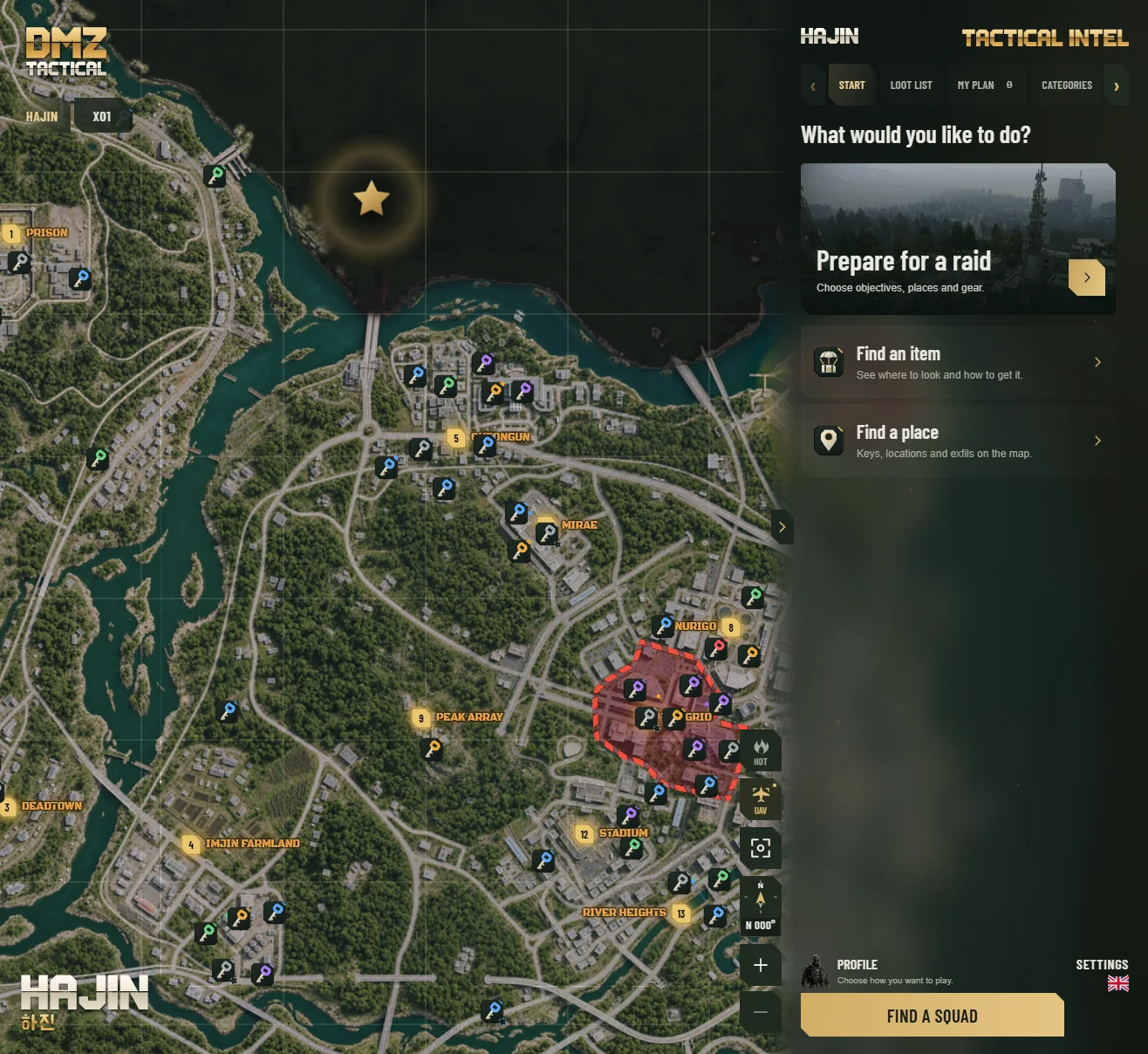
DMZ Tactical start screen with the Hajin map, key markers, Hot Zones and the Tactical Intel panel.
  • Offline mapHajin and X01 work without internet
  • F8 overlayYour plan on top of the game
  • No accountInstall and start planning
  • FreeNo ads, no analytics

Everything for your raid in one app

DMZ Tactical brings together the map, the loot and the plan you need before you deploy into Hajin. It is built for players who want answers quickly, with no browser tabs open on a second screen.

Hajin and X01 map with every key

A fast, zoomable map of Hajin and the X01 Exclusion Zone. It keeps working offline.

  • Keys, locked doors and points of interest by rarity
  • Locations, exfils, commanders and grid squares (for example B5 or F4)
  • Hot Zones show where PvP fights are likely
  • UAV mode gives an orbiting view of the map
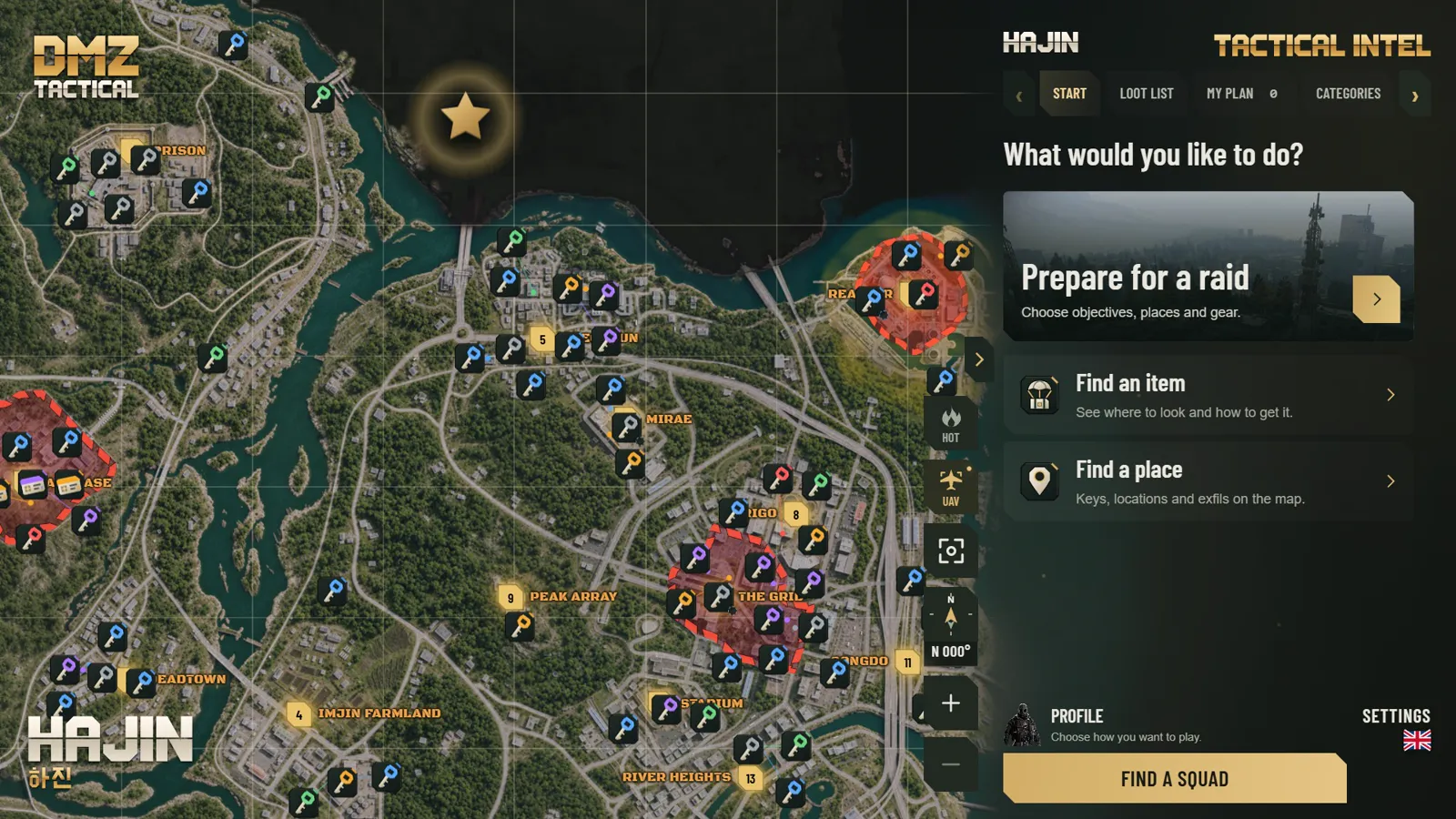
Hajin map in DMZ Tactical with key markers by rarity, numbered locations and Hot Zones.

Find any item and where it drops

Search an item, a key or a location. DMZ Tactical shows how to get it, which containers it comes from and how often.

  • Containers with drop rates, such as Tool Chest 1 in 52
  • Places on the map with their grid square
  • Add items to your loot list with the amount you need
  • FOB upgrades and 3D printer crafts add their materials for you
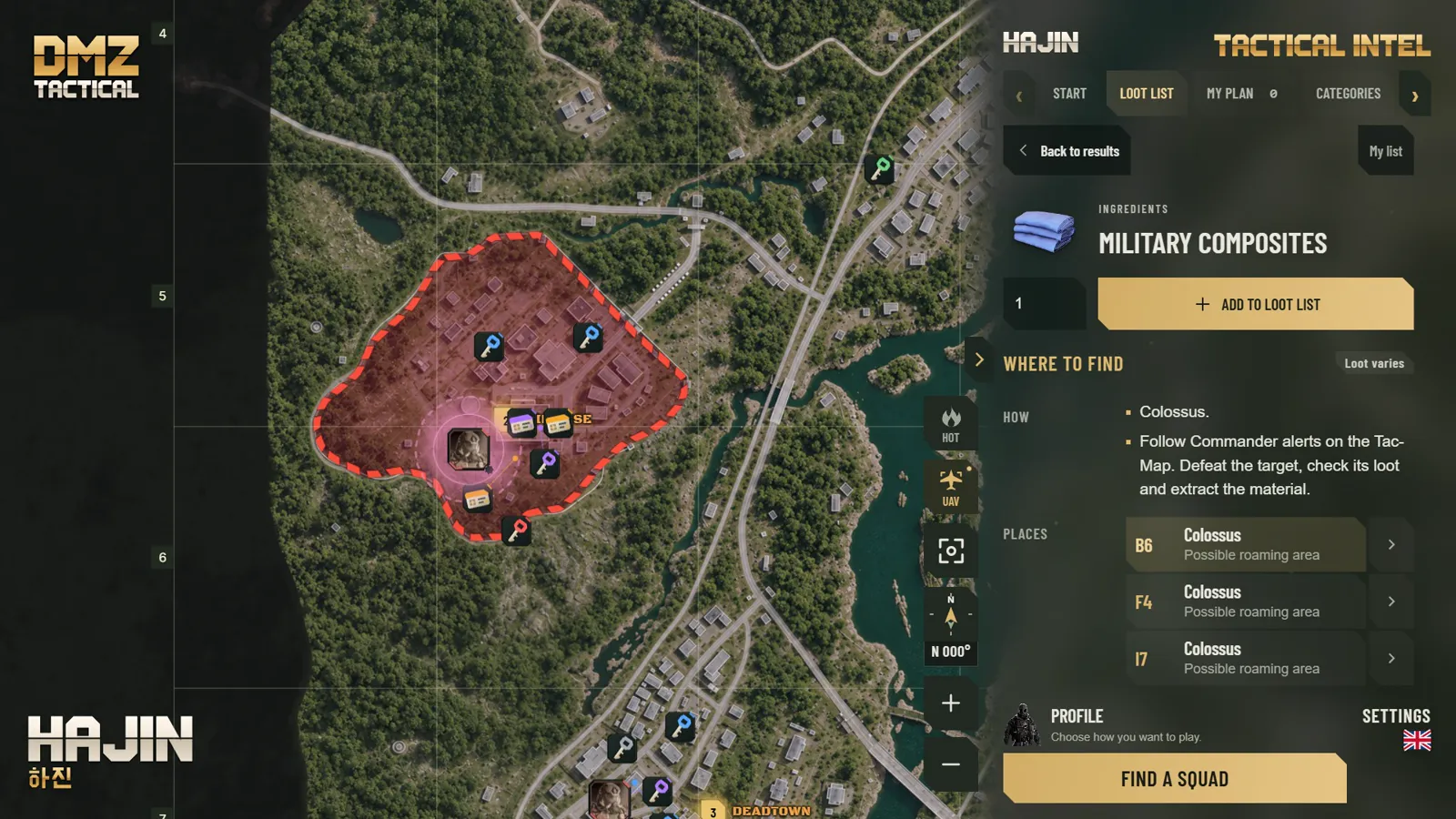
Item details for Military Composites: how to get it and three possible Colossus areas with grid squares.

Raid plan and F8 overlay

Choose objectives, stops, keys and loadout in one raid plan. In game, press F8 to open it in a window above Call of Duty, and press F8 again to go back.

  • Route stops, DMZ Orders progress and items to loot
  • Search zones on a mini map. It does not show your position
  • Change amounts and mark items as done without leaving the game
  • Works in Borderless or Windowed display mode
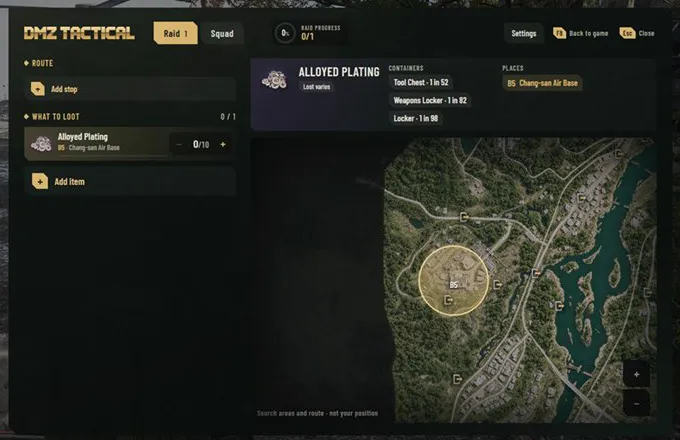
F8 overlay above the game showing the route, the loot list and a search zone for Alloyed Plating on the mini map.

Weapon meta, builds and Operator Traits

See which weapons are strong this season, with full attachment builds and the level each part unlocks at.

  • Season 1 weapon tiers from Meta to D
  • Long range and versatile builds per weapon
  • Add a loadout to your raid plan
  • Operator Traits planner with points and trade-offs
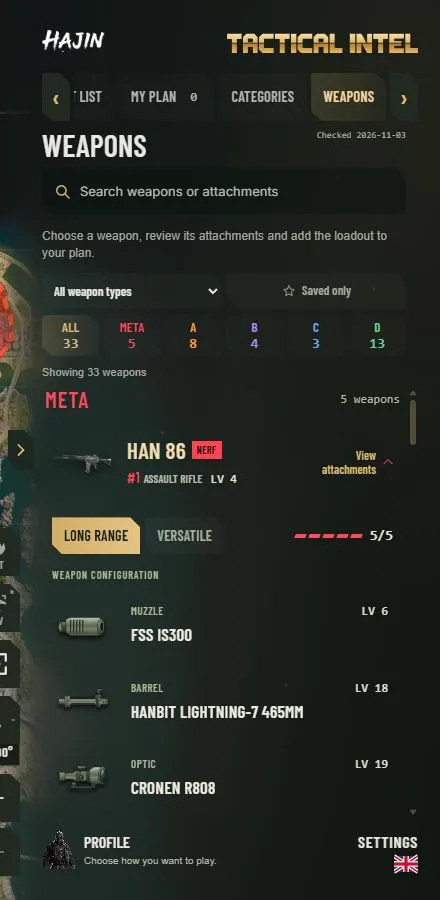
Weapons tab with Season 1 tiers and a full HAN 86 long range build with attachment unlock levels.

Start in three steps

  1. Install

    Download DMZTactical-Installer.exe and run it. Your plans and settings stay when you update.

  2. Find

    Search for a key, an item, a location or a grid square. The map shows where to go.

  3. Press F8

    Set the game to Borderless or Windowed mode. Then press F8 in a raid to open your plan.

Safe by design

Separate from the game

DMZ Tactical runs as its own Windows app. It doesn't read or change game files or memory and doesn't send input to the game.

Your data stays on your PC

The map, plans, loot lists and settings are stored in your Windows profile. No account is needed.

Verified updates

Updates come from GitHub and are checked with a signed manifest and SHA-256 file hashes.

No ads or tracking

There are no ads and no analytics in the app or on this website.

Roadmap to 1.0

Roadmap to 1.0, drawn as a raid route on the Hajin map from infil to exfil. 0.9.2 X01, in progress: X01 floor plans are out now, the weapon builder is in progress. 0.9.3 Updates: every release tested as an update, a backup update notice and the Discord command /where. 0.9.4 Squad plans: share a raid plan with a code, and the next stop's grid square in F8. 0.9.5 Raid log: log your loot after a raid, and map changes after game updates. 0.9.6 Mac: first macOS test build. 0.9.7 Account: plans synced across PCs, squad search returns, report item spots. 0.9.8 Routes: suggested route for your items, first raid guide, gamepad support in F8. 0.9.9 Final testing on Windows and Mac, in English and Lithuanian. 1.0 Full release: Windows and Mac, complete Hajin and X01 maps. Ongoing: bug fixes, performance and quality of life. After 1.0: Android, iOS and web. Plans are subject to change.
Read the roadmap as text
  1. 0.9.2 · in progressX01 floor plans are out now; weapon builder in progress
  2. 0.9.3Every release tested as an update, a backup update notice and the Discord command /where
  3. 0.9.4Share a raid plan with your squad using a code; the next stop's grid square in F8
  4. 0.9.5Raid log for the loot you brought back, and map changes after game updates
  5. 0.9.6First macOS test build
  6. 0.9.7Account: plans synced across PCs, squad search returns, report item spots
  7. 0.9.8Suggested route for your items, first raid guide and gamepad support in F8
  8. 0.9.9Final testing on Windows and Mac, in English and Lithuanian
  9. 1.0Full release for Windows and Mac with complete Hajin and X01 maps
  10. After 1.0Android, iOS and web

Bug fixes, performance and quality of life improvements continue in every update. Plans are subject to change. Follow progress on Discord.

Frequently asked questions

Is DMZ Tactical free?

Yes. DMZ Tactical is free to download and use. There are no ads and no paid features.

Is DMZ Tactical safe to use with Call of Duty?

DMZ Tactical runs as a separate Windows app. It doesn't read or modify game files or memory, and it doesn't send input to the game. The F8 overlay is a standard window shown on top of the game. Activision hasn't reviewed DMZ Tactical, so we can't say how its security systems treat other apps.

Which maps does it cover?

Hajin and the X01 Exclusion Zone from Call of Duty: Modern Warfare 4 DMZ. X01 floor plans are next on the roadmap.

Does the map work offline?

Yes. The map, item search, raid plans and loot lists work without internet. You need a connection to download the app and get updates.

How do I open the in-game overlay?

Set the game display mode to Borderless or Windowed and press F8. Press F8 again or Esc to return to the game. You can change the key in Settings.

Does it work with PlayStation or Xbox?

Yes, on a Windows PC next to your console. The F8 overlay needs the game running on the same PC.

Does it read my inventory?

No. You enter item counts yourself, and the loot list shows what you still need.

Why does Windows show a warning when I install it?

The installer isn't code-signed yet, so Windows SmartScreen may ask you to confirm. You can check the file's SHA-256 hash on the download page. Updates are verified with a signed manifest and file hashes.

How do I update DMZ Tactical?

Open Settings and choose Check for updates. If no update appears, download the installer again and run it. Your plans and settings stay.

Is there a Mac version?

Yes, a macOS version is planned. The first macOS test build is planned for version 0.9.6, and 1.0 will support Windows and Mac.

Which languages are supported?

English and Lithuanian. Map, item and location names stay as they appear in the game.

Ready for your next raid?

Version 0.9.23-beta.1 for Windows. Free, no account required.

Download for Windows. Version 0.9.23-beta.1, Windows x64, 193 MB.